- Shopify
How To Fix Shopify Product Pages That Attract Traffic But Do Not Convert
18 Jun 2026
Many Shopify stores have a frustrating problem. Product pages receive traffic, SEO rankings look reasonable, ads bring visitors in and social media campaigns generate clicks, but sales still do not happen.
When a Shopify store has traffic but no sales, the problem is not always traffic volume. In many cases, the product page is creating hesitation. Customers arrive with interest, but they do not feel confident enough to add to cart, start checkout or complete the purchase.
To improve Shopify product page performance, businesses can work with an experienced CRO agency to review product messaging, imagery, pricing clarity, reviews, trust signals, shipping information, mobile usability, product options, cart behaviour and checkout friction.
For ecommerce managers, marketing teams and business owners, this matters because traffic without conversion wastes media spend, increases customer acquisition cost, weakens ROAS and makes growth harder to scale profitably.
1. Why Your Shopify Store Has Traffic But No Sales
A Shopify store may get traffic but no sales when visitors do not find enough clarity, trust or motivation to buy.
This can happen even when the product is good. Customers may like the product, but still hesitate because they cannot answer important questions quickly.
They may wonder:
- Is This Product Right For Me?
- Can I Trust This Store?
- What Is Included?
- How Long Will Shipping Take?
- What If I Need To Return It?
- Are There Reviews?
- Is The Price Fair?
- Are There Better Options Elsewhere?
- Is This Product Available In My Size, Colour Or Variant?
- Is Payment Safe?
- Why Should I Buy Now?
If the product page does not answer these questions clearly, visitors may leave without adding to cart.
This is why many store owners ask: why is my Shopify store getting traffic but no sales?
The answer is often conversion friction on the product page, cart or checkout journey.
2. What Does A Low Shopify Product Page Conversion Rate Mean?
A low Shopify product page conversion rate means visitors are viewing products but not taking the next step towards purchase.
Depending on the store, this may show up as:
- Low Add-To-Cart Rate
- Low Checkout Start Rate
- High Product Page Exit Rate
- High Bounce Rate
- Strong Product Views But Low Sales
- Paid Traffic Clicking But Not Buying
- Mobile Users Dropping Off
- Customers Abandoning Product Options
- High Cart Abandonment
- Product Pages Ranking But Not Converting
The issue may sit on the product page itself, or it may continue into cart and checkout.
Before assuming traffic quality is poor, businesses should review how users behave after landing on the product page.
3. Shopify Product Page Conversion Priority Order
Before redesigning product pages, review the highest-impact conversion areas first.
- Traffic Quality – Check whether visitors are coming from SEO, paid ads, social media, email or referral traffic, and whether the audience matches the product.
- Product Clarity – Make sure the page clearly explains what the product is, who it is for and why it matters.
- Product Images – Use images that show the product clearly, in context and from useful angles.
- Reviews And Social Proof – Show reviews, ratings, customer photos or user-generated content near the buying decision.
- Shipping And Returns – Make delivery costs, timeframes, returns and exchanges easy to find.
- Mobile Experience – Check whether images, variants, buttons and checkout steps are easy to use on mobile.
- Add-To-Cart Button – Make the main call to action visible, clear and easy to tap.
- Product Options – Simplify size, colour, bundle, subscription or variant choices.
- Page Speed – Review whether Shopify apps, scripts, large images or theme issues are slowing the page.
- Checkout Friction – Check whether users drop from cart, checkout start or payment steps.
4. Common Reasons Shopify Product Pages Do Not Convert
Product pages usually fail because they do not reduce enough buying hesitation.
Common reasons include:
- Weak Product Images – Customers cannot clearly see the product, details, scale, texture, fit or use case.
- Unclear Product Copy – The page describes the product but does not explain why it matters, who it is for or what problem it solves.
- Hidden Shipping Costs – Customers do not know delivery costs or timing until too late.
- Missing Reviews – The page lacks social proof, making customers less confident.
- Poor Mobile Experience – Buttons, images, menus or product options are hard to use on mobile.
- Weak Call To Action – The add-to-cart button is hard to find, not persuasive or pushed too far down the page.
- Confusing Product Variants – Size, colour, bundle or subscription options are unclear.
- Lack Of Trust Signals – The page does not show secure payment options, return policy, guarantees or customer support.
- Slow Page Speed – Large images, Shopify apps or tracking scripts make the page slow to load.
- Poor Product-Market Fit – The traffic may not match the product, price point or customer intent.
5. What To Check First Before Redesigning Shopify Product Pages
Before rebuilding Shopify product pages, start with the conversion basics.
- Product Page Traffic Source – Check whether traffic comes from SEO, paid ads, social media, email or referrals.
- Add-To-Cart Rate – Review whether visitors are showing purchase interest.
- Checkout Start Rate – Check whether customers move from cart to checkout.
- Purchase Conversion Rate – Review how many product page visitors become buyers.
- Mobile Performance – Compare mobile and desktop conversion rates.
- Product Image Quality – Check whether images show the product clearly and practically.
- Product Copy Clarity – Review whether the page answers customer questions.
- Shipping And Returns – Make sure delivery, returns and exchange information is easy to find.
- Reviews And Social Proof – Check whether customer proof appears near the buying decision.
- Page Speed – Review whether slow loading is creating drop-off.
- Checkout Performance – Identify whether the issue is on the product page, cart or checkout.
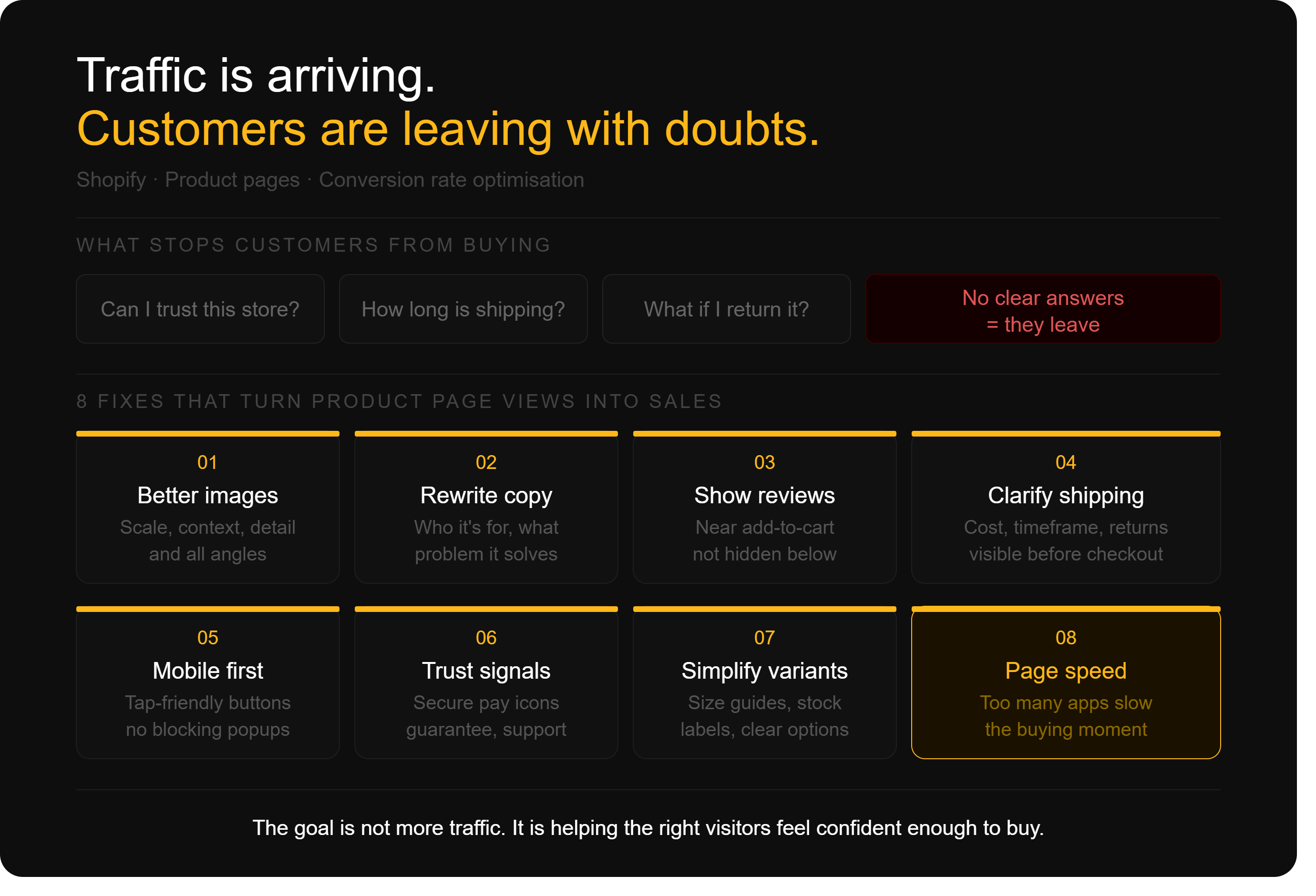
6. How To Improve Shopify Product Page Conversion Rate
6.1 Improve The Product Area Above The Fold
The first screen of a Shopify product page should quickly explain what the product is, why it matters and what the customer should do next.
Above the fold, customers should usually see:
- Product Name
- Clear Product Image
- Price
- Key Benefit
- Reviews Or Ratings
- Variant Options
- Add-To-Cart Button
- Shipping Or Returns Reassurance
- Payment Options Where Relevant
If customers need to scroll too far to understand the value or find the buy button, the page may lose conversions.
On mobile, this section is even more important because screen space is limited.
6.2 Use Better Product Images
Images are one of the biggest conversion drivers on Shopify product pages.
Customers cannot touch or try the product, so images need to answer visual questions. Strong product images should show:
- Front, Back And Side Views
- Close-Up Details
- Product In Use
- Size Or Scale
- Packaging Where Relevant
- Colour Or Variant Differences
- Lifestyle Context
- Before And After Where Suitable
For fashion, furniture, beauty, food, homewares and lifestyle products, images often influence confidence more than long product descriptions.
6.3 Rewrite Product Copy Around Customer Doubts
Many product descriptions focus too much on features and not enough on customer decision-making.
Instead of only listing what the product is, explain why it is useful, who it is for and what problem it solves.
Good Shopify product copy should answer:
- What Is The Product?
- Who Is It For?
- What Makes It Different?
- What Problem Does It Solve?
- What Is Included?
- How Do I Use It?
- What Size, Fit Or Variant Should I Choose?
- Why Should I Trust It?
- What Happens After I Order?
This helps reduce uncertainty and makes the buying decision easier.
6.4 Make Reviews And Social Proof More Visible
Reviews help customers feel more confident before buying.
If reviews are hidden near the bottom of the page, customers may not see them at the moment they are deciding whether to add to cart.
Useful social proof includes:
- Star Ratings
- Written Reviews
- Customer Photos
- User-Generated Content
- Testimonials
- Press Mentions
- Best-Seller Labels
- Number Of Customers Served
- Before-And-After Proof Where Relevant
The goal is to show that real people have bought, used and trusted the product.
6.5 Clarify Shipping, Returns And Payment Options
Unexpected delivery costs and unclear return policies can stop customers from buying.
Important information should be visible before checkout, not hidden at the end.
Product pages should clearly explain:
- Shipping Cost
- Delivery Timeframe
- Free Shipping Threshold
- Returns Or Exchange Policy
- Warranty Or Guarantee
- Payment Methods
- Shop Pay
- Afterpay Or Other Buy Now Pay Later Options
- International Shipping Where Relevant
Customers should not need to search for these answers.
6.6 Improve Mobile Product Page Experience
Many Shopify customers browse and buy on mobile, but many product pages are still easier to use on desktop.
Mobile issues can include small buttons, hard-to-select variants, slow images, sticky popups, long descriptions, poor spacing or add-to-cart buttons pushed too far down the page.
To improve mobile conversion, check:
- Is The Add-To-Cart Button Easy To Tap?
- Are Product Images Fast And Clear?
- Are Size And Colour Options Simple To Use?
- Is The Page Easy To Scroll?
- Are Popups Blocking The Product?
- Is Checkout Easy To Start?
- Is Key Information Visible Without Too Much Effort?
Mobile product pages should feel simple, fast and confidence-building.
6.7 Simplify Product Options And Variants
Product variants can create confusion if they are not presented clearly.
If customers are unsure which size, colour, bundle or subscription option to choose, they may delay the purchase or leave.
Useful improvements include:
- Clear Size Guides
- Variant Images
- Low Stock Indicators
- Best Value Labels
- Bundle Explanations
- Subscription Versus One-Time Purchase Clarity
- Product Comparison Notes
- Default Option Clarity
- Out-Of-Stock Messaging
The easier the choice feels, the more likely customers are to continue.
6.8 Strengthen Trust Signals
Trust is critical when customers are buying from a Shopify store for the first time.
A product page should make the store feel credible, safe and easy to buy from.
Trust signals may include:
- Secure Payment Icons
- Accepted Payment Methods
- Customer Support Details
- Returns Policy
- Australian Shipping Information
- Warranty Or Guarantee
- Brand Story
- Review Count
- Real Business Contact Details
- FAQ Section
Trust signals should support the buying decision without cluttering the page.
6.9 Review Product Schema And Structured Data
Product schema helps search engines understand product details such as price, availability, reviews and ratings.
Structured data will not fix conversion issues by itself, but it can support organic search visibility and improve how product information appears in search results.
Shopify stores should check whether product schema includes:
- Product Name
- Price
- Availability
- Product Image
- Brand
- Review Or Rating Data Where Valid
- SKU Or Product Identifier Where Relevant
If product pages attract SEO traffic, structured data can help make those listings more useful and relevant before the visitor even arrives.
6.10 Review Page Speed And App Load
Shopify stores often rely on apps for reviews, subscriptions, upsells, popups, chat, analytics and personalisation. These apps can add value, but they can also slow down product pages.
Slow pages can reduce engagement, especially on mobile.
Review whether the store has:
- Too Many Apps Loading On Product Pages
- Large Uncompressed Images
- Heavy Scripts
- Unused Tracking Tags
- Slow Theme Code
- Poor Mobile Performance
- Delayed Add-To-Cart Functionality
A faster product page usually creates a smoother buying experience.
6.11 Analyse Behaviour Before Making Changes
Before making major design changes, review customer behaviour.
Useful tools and reports include:
- Shopify Analytics
- GA4 Ecommerce Reports
- Google Search Console
- Microsoft Clarity
- Heatmaps
- Session Recordings
- Add-To-Cart Rate
- Checkout Start Rate
- Product Page Exit Rate
- Cart Abandonment Rate
- Conversion Rate By Device
- Conversion Rate By Traffic Source
This helps identify whether the issue is traffic quality, product page experience, cart friction or checkout problems.
Behavioural data becomes more valuable when it leads to structured action. An experienced CRO agency can combine Shopify Analytics, GA4, heatmaps and session recordings to identify why visitors hesitate, then prioritise tests across product messaging, trust signals, mobile usability, cart and checkout.
7. What Ecommerce Managers, Marketers And Store Owners Should Review
Ecommerce managers should review product page performance by product, category, device and traffic source. They should identify which pages attract traffic but fail to generate add-to-cart actions or purchases.
Marketing teams should review whether campaign messaging matches the product page. If ads promise one benefit but the product page focuses on something else, customers may lose confidence.
Store owners should focus on revenue impact. The key question is not only whether the store gets traffic, but whether that traffic turns into profitable sales.
8. When To Work With A Shopify Agency Or Shopify Consulting Partner
You should consider working with a Shopify agency or Shopify consulting partner when product pages receive traffic but do not convert, and the cause is unclear.
For Sydney-based ecommerce businesses, working with a CRO agency in Sydney can add a focused conversion layer to Shopify support. By combining behavioural analysis with structured experimentation, the agency can determine whether underperformance comes from product-page clarity, mobile usability, trust, cart friction or checkout.
A practical Shopify consulting approach can help teams.
For Sydney-based ecommerce businesses, working with a CRO agency in Perth can complement Shopify development support by analysing customer behaviour and testing improvements across product-page clarity, mobile usability, trust signals, cart friction and checkout.
- Audit Product Page Conversion Issues
- Review Shopify Analytics And GA4 Data
- Identify Product Pages With High Traffic And Low Sales
- Improve Product Page Layouts
- Rewrite Product Messaging
- Review Reviews, Trust Signals And Social Proof
- Improve Mobile Experience
- Check Cart And Checkout Friction
- Review Shopify Apps And Page Speed
- Review Product Schema And Structured Data
- Build A Product Page CRO Roadmap
This helps Shopify businesses move from traffic generation to revenue improvement.
9. Final Thoughts
A Shopify store with traffic but no sales does not always need more traffic first. It often needs better product pages.
To improve Shopify product page conversion rate, businesses should focus on clarity, trust, speed, mobile experience, product imagery, reviews, shipping information, calls to action, product options and customer decision-making.
When product pages answer customer questions clearly and reduce hesitation, traffic has a better chance of turning into sales.
The goal is not just to attract visitors. The goal is to help the right visitors feel confident enough to buy.
10. FAQs
Q. How Do You Improve Shopify Product Page Conversion Rate?
A. To improve Shopify product page conversion rate, improve product images, clarify product copy, show reviews, make shipping and returns clear, improve mobile usability, strengthen trust signals, simplify product options and make the add-to-cart button easy to find.
Q. Why Does My Shopify Store Have Traffic But No Sales?
A. Your Shopify store may have traffic but no sales because visitors do not have enough confidence to buy. Common issues include unclear product messaging, weak images, hidden shipping costs, missing reviews, poor mobile experience, slow page speed or checkout friction.
Q. Why Is My Shopify Store Getting Traffic But No Sales From Ads?
A. If paid traffic is not converting, the ad message may not match the product page, the audience may be too broad or the page may not answer customer questions clearly. Review traffic quality, landing page relevance, pricing, trust signals and checkout flow.
Q. What Should A Shopify Product Page Include?
A. A strong Shopify product page should include clear product images, product name, price, key benefits, reviews, variant options, add-to-cart button, shipping details, returns information, payment options, FAQs and trust signals.
Q. How Can Product Images Improve Shopify Conversions?
A. Product images improve conversions by helping customers understand the product visually. Images should show different angles, close-up details, scale, lifestyle use, colour variations and practical context.
Q. Do Reviews Help Shopify Product Pages Convert?
A. Yes. Reviews help build trust and reduce hesitation. Star ratings, written reviews, customer photos and user-generated content can make visitors feel more confident before buying.
Q. Why Is Mobile Experience Important For Shopify Conversion Rate?
A. Mobile experience is important because many customers browse Shopify stores on mobile devices. If product images, variant selectors, buttons or checkout steps are hard to use, customers may leave without buying.
Q. Should I Redesign My Shopify Product Pages?
A. You should redesign Shopify product pages if users are viewing products but not adding to cart, mobile performance is poor, product information is unclear or trust signals are missing. Start with data before making major design changes.
Q. What Metrics Should You Track On Shopify Product Pages?
A. Important metrics include product page views, add-to-cart rate, checkout start rate, purchase conversion rate, revenue, product page exit rate, cart abandonment rate, conversion rate by device and conversion rate by traffic source.
Q. When Should You Work With A Shopify Agency Or Consulting Partner?
A. You should work with a Shopify agency or Shopify consulting partner when your store has traffic but no sales, product pages are underperforming or you need help improving conversion rate, mobile experience, analytics and CRO strategy.

Recent Posts

Case Studies
Business News Australia
On Track Meals
Suncorp